


Meal Planner & Grocery List
4.5679.00 Reviews
App Specs
- Version
- 5.45.8
- Updated On
- License
- Free
- Downloads
- 1,000,000+
- Developer
- JoJo Apps: Meal Planner and Shopping List
- Categories
- Food & Drink
- Platform
- Android, iOS
Screenshots


 Analysis by AppCompare
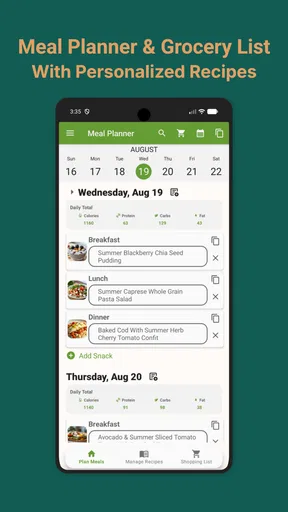
When I try to make a week of meals work around errands, work, and whatever is already in the fridge, the hard part is often remembering what I planned and what I need to buy. Meal Planner & Grocery List is built around connecting those jobs: I can plan meals, keep recipes together, and turn a plan into a shopping list. That makes it more useful than a recipe browser alone, though it works best when I’m willing to do a little organizing before the busy part of the week begins.
What the app is designed to make easier
This is a Food & Drink app from JoJo Apps: Meal Planner and Shopping List. It is free to download, has a 4.6 average from around 21,000 ratings, and has passed a million installs. Those figures suggest that plenty of people find the meal-planning approach worthwhile, but my recommendation depends more on whether you want a single place for planning and shopping than on popularity alone.
The app is rated for Everyone, and its current version is 5.40.6, with Android 6.0 as the minimum operating system. It also offers in-app purchases, ranging from $0.49 to $19.99 per item. I’d start with the free experience and decide whether the paid options fit your routine before spending anything; a simple weekly plan may not call for extras, while frequent use could make additional tools more appealing.
Speed expectations and a practical routine
Meal planning is not a task where raw speed is the only measure. The useful question is whether I can move from “what should we eat?” to a workable plan without creating more admin. The app’s linked planning and shopping-list workflow is designed to reduce that switching around. If I already have a few meals in mind, placing them into a week and building a list is a more direct process than writing menus in one app and copying ingredients into a notes app.
A realistic use is a Sunday check-in: I look at the coming week, choose a few dinners, add a family recipe where needed, and review the shopping list before heading out. That small review matters. I can remove items I already have, check whether a recipe needs a specialty ingredient, and avoid treating every suggested meal as a commitment. A plan with a couple of flexible nights is often more usable than filling every slot and then abandoning it when plans change.
For someone who shops on the way home, the generated list can also serve as a quick handoff between planning and the store. It is still worth checking the list against what is actually in the kitchen. Automated lists can save rewriting, but they do not replace a final look at cupboards, quantities, or household preferences.
Using Meal Planner & Grocery List in everyday life
Hey there, fellow foodies! So, I recently had the chance to dive into the world of the Meal Planner & Grocery List app, and let me tell you, it’s like having a personal assistant in your pocket. You know, the kind that keeps you from buying three jars of peanut butter when you already have five at home. If you’re anything like me, trying to juggle meal planning with a busy schedule, this app might just be your new best friend.
Worth Reading Before You Choose

EA SPORTS FC Mobile 26 Is a Bigger Football Game, but It Takes Time

Flipboard Shows What News Apps Must Do Beyond the Feed

Switching to Android Auto Means Rethinking Your Driving Routine

Google Calendar Makes a Crowded Week Easier to Manage

Ludo King Makes the Most of the Minutes Between Plans

Baby Panda World Brings Quick Play to Modern Phones, but Its Game Library Feels Busy
Getting Started with Meal Planner & Grocery List
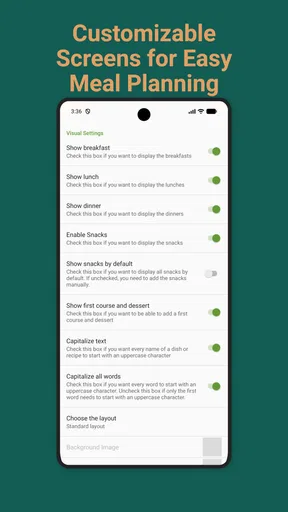
First things first, downloading and setting up the Meal Planner & Grocery List app was a breeze. Available on both Android and iOS, it’s super easy to find in the app store. Once you’ve got it installed, you’re greeted with a neat and clean interface. No overwhelming buttons or confusing menus — just a straightforward design that even my grandma could figure out. Seriously, it’s user-friendly.
The initial setup includes entering your dietary preferences, allergies, and any specific nutritional goals. Whether you’re vegan, gluten-free, or just trying to cut back on sugar, the app tailors its suggestions accordingly. It’s like having a dietitian on standby, minus the hefty fees!
Planning Meals Like a Pro
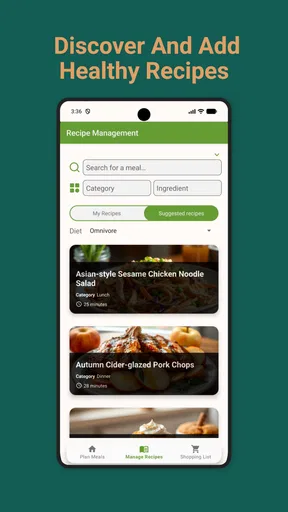
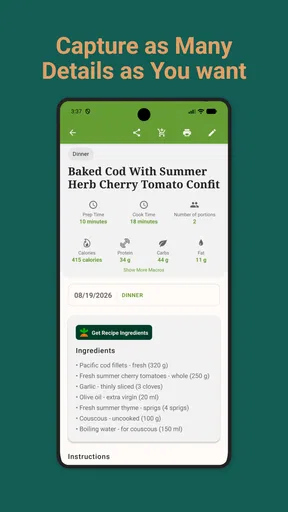
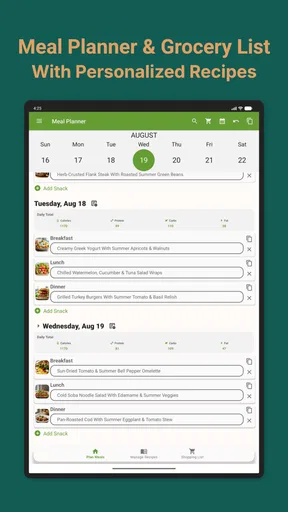
Alright, let’s talk about the core feature — meal planning. This app allows you to plan your meals for the week, and it’s as simple as dragging and dropping recipes into your calendar. You can browse through a plethora of recipes, each with detailed nutritional information. I was amazed at the variety, from quick 15-minute meals to more elaborate weekend projects.
One thing that really stood out to me was the option to add your own recipes. Got a family favorite or a secret recipe you want to keep track of? Just add it in, and it’ll be there whenever you need it. This feature is a game-changer for those of us who love to experiment in the kitchen.
Making a plan that survives a busy week
The best way I’ve found to use a weekly planner is not to treat it as a strict contract. I’d put the meals that genuinely need planning on particular days, especially anything that depends on fresh ingredients or a longer cooking window. Then I’d leave room for leftovers, an easy fallback, or a change of plans. The calendar is most helpful when it reflects how the household actually eats, rather than an ideal week that never happens.
Adding your own recipes is especially useful for dishes you cook from memory or adapt each time. I’d use that space for a reliable family dinner, a recipe with ingredient substitutions, or a meal that uses up produce before it goes off. The trade-off is that entering and maintaining personal recipes takes some effort. If you rarely cook the same dish twice, a saved recipe collection may be less valuable than simply browsing for fresh ideas.
Dietary preferences can help narrow what feels suitable, but I would still read each recipe and check ingredients carefully, particularly when an allergy is involved. A preference setting is a planning aid, not a reason to skip ordinary ingredient checks. That is a sensible habit in any recipe app, and it matters even more when different people in a home have different needs.
Grocery Shopping Made Easy
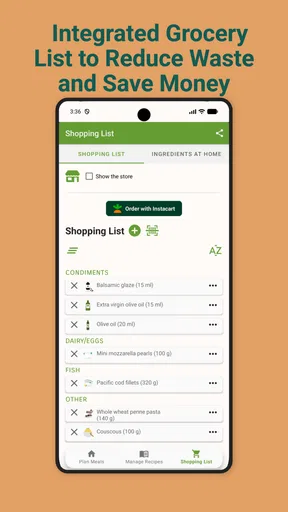
Now, onto the grocery list feature. This is where the app shines. As you plan your meals, the app automatically generates a grocery list, organizing items by category. I can’t tell you how much time this saved me. No more wandering up and down aisles like a lost puppy!
And get this — the app even lets you check off items as you shop, and syncs with other users. So if you’re sharing the shopping duties with a partner or roommate, you can both stay updated in real-time. It’s like having a virtual shopping buddy.
- Automatic list generation
- Real-time syncing with other users
- Item categorization for efficient shopping
Sharing the list without losing track
Shared shopping works best when everyone agrees on how to use the list. If one person is buying ingredients for dinner and another is picking up household staples, checking items off as they go can prevent accidental duplicates. Before splitting the shopping, I’d make sure the list is current and that everyone knows whether an item is already in the basket or still needed. The app can keep shared users aligned, but the household still has to use the same list consistently.
For a solo shopper, categories can make a familiar store easier to move through because related items appear together. For a store with a different layout, I would treat the grouping as a guide rather than a perfect aisle map. The practical win is having a single checklist to consult, not expecting the app to know the arrangement of every shop.
Additional Features You’ll Love
Beyond meal planning and grocery shopping, the app offers some nifty extras. There’s a pantry tracker to help you avoid duplicate purchases, and even a budget tracker to keep your spending in check. I found these features incredibly helpful in managing my weekly food expenses.
Plus, the app sends you reminders for upcoming meals and grocery runs. No more “oops, I forgot to defrost the chicken” moments. It’s like having a little chef whispering in your ear.
When the extra organization helps—and when it doesn’t
The pantry tracker is most useful as a prompt to check what is on hand before shopping, not as a substitute for keeping the pantry information accurate. If several people put groceries away or ingredients get used without being noted, any digital inventory can drift out of date. I’d use it for the items I often buy twice, such as pantry staples, and do a quick physical check before relying on it for a full shop.
The budget tracker can add useful visibility if you want to keep an eye on food spending, but tracking only helps when I enter information consistently. It is better suited to someone who likes reviewing purchases than to someone looking for a completely hands-off budget tool. Reminders have a similar trade-off: they can catch a meal or shop I might forget, but too many prompts can become background noise, so I’d keep attention on the ones that solve a real problem in my week.
Heavy-use moments, reliability, and device fit
Most of the work here is planning, browsing, and checking a list, so I would expect it to feel most useful in short sessions: choosing meals, adding a recipe, or checking off groceries. I can’t judge performance from a benchmark, and I wouldn’t promise that every device or connection behaves identically. The more practical performance question is whether the plan and list remain easy to follow when I’m moving between home and a busy shop.
Shared lists and a full week of meals are the moments when organization matters most. To make that workflow dependable, I’d review the plan before shopping and make sure anyone sharing the list is using the same one. If a change is important, such as replacing a meal or removing an item, checking that the updated list is visible before splitting up is a sensible habit. It avoids relying on memory when several people are coordinating.
On Android, the minimum operating system is 6.0, which gives people with older compatible devices a clear baseline to check. The app is also available on iOS. I’d still consider the phone’s age and available storage when deciding whether any current app is a good fit, but there is no reason to expect a meal-planning tool to need the same resources as a graphics-heavy game. If a device is already short on space or runs slowly, keeping the recipe collection and plan focused may make the overall routine less cumbersome.
Who will get the most from it?
I’d recommend this app to people who repeat meals, cook for a household, or want to coordinate shopping with someone else. It is also a good match for anyone trying to make dietary preferences part of a weekly routine rather than searching from scratch at every meal. The strongest case is for a user who wants recipes, a calendar, and a shopping checklist connected in one place.
It is less compelling if you already have a meal system you genuinely enjoy, or if you prefer spontaneous cooking and rarely buy ingredients for planned recipes. Someone who mainly needs a plain checklist may find a basic notes app quicker and less involved. Likewise, a person who wants a deep recipe discovery experience built around a very specific cuisine may prefer a dedicated recipe source, then use this app only if organizing the resulting meals and shopping list is worth the extra setup.
Compared with the usual alternatives, the main distinction is the joined-up workflow. A calendar by itself can schedule dinners but leaves the shopping list to you; a grocery checklist can manage items but does not necessarily help decide what to cook. Keeping those steps together is the reason to choose this app. The compromise is that an all-in-one organizer asks you to maintain more information than a paper list or a quick note.
A Few Words of Advice
While the Meal Planner & Grocery List app is pretty fantastic, there are a couple of things to keep in mind. The recipe database is vast, but it might not have every cuisine under the sun. If you’re craving something super specific, you might need to add your own recipe.
Also, while the app is free to download, some advanced features require a subscription. It’s worth it if you’re serious about meal planning, but it’s something to consider if you’re on a tight budget.
Overall, I’ve found the Meal Planner & Grocery List app to be a lifesaver in my weekly routine. It’s efficient, user-friendly, and honestly, kind of fun to use. If you’re looking to streamline your meal prep and grocery shopping, this app is definitely worth checking out.
Happy cooking!
My performance verdict
I see this as a practical organizer, not an app that needs to impress with speed tricks. Its value comes from reducing small bits of repeated work: deciding what to cook, keeping personal recipes handy, and turning planned meals into a list that can be shared. A quick weekly review and an occasional check of the pantry help the system stay useful, while trying to track every ingredient perfectly can turn the same tools into extra chores.
If you want a connected routine for meals and shopping, I’d give it a try at no cost and build a modest plan before deciding whether any paid option is worthwhile. If you only want occasional recipe inspiration or a bare-bones list, a simpler alternative may suit you better. For households that benefit from seeing meals and groceries together, though, this app offers a clear, everyday reason to keep planning in one place.
Pros
- User-friendly interface for easy navigation.
- Customizable meal plans to suit dietary needs.
- Syncs across devices for convenience.
- Extensive recipe database for inspiration.
- Tracks nutritional info for balanced meals.
Cons
- Limited offline functionality.
- Some features require premium subscription.
- Occasional syncing issues reported.
- Ads can be intrusive in free version.
- No integration with certain grocery apps.
FAQs for Meal Planner & Grocery List
What features does the Meal Planner & Grocery List app offer?
The Meal Planner & Grocery List app provides a comprehensive solution for meal preparation and shopping. Features include customizable meal plans, a database of recipes, automatic grocery list generation, and nutritional tracking. The app also allows users to input dietary preferences and restrictions, making it easier to tailor meals to individual needs.
Is the app user-friendly for beginners?
Yes, the app is designed with user-friendliness in mind. Its intuitive interface guides users through the process of setting up meal plans and creating shopping lists. Beginners can easily navigate through its features, thanks to step-by-step tutorials and helpful tips provided within the app.
Can I sync my meal plans across multiple devices?
Absolutely. The Meal Planner & Grocery List app supports synchronization across multiple devices. Whether you're using an Android or iOS device, you can access your meal plans and grocery lists from anywhere. This feature is particularly useful for families or individuals who manage their meals on the go.
Does the app support dietary preferences and restrictions?
Yes, the app caters to various dietary preferences and restrictions. Users can specify their dietary needs, such as vegan, gluten-free, or low-carb, to ensure the meal plans and recipes align with their lifestyle. This customization makes it easier to maintain specific diets without extra hassle.
Is there a cost associated with the app?
The Meal Planner & Grocery List app offers both free and premium versions. The free version includes basic features like meal planning and grocery list creation. For advanced features like personalized nutrition tracking and exclusive recipes, users can opt for the premium subscription, which is available at a reasonable monthly fee.


